
- Step 1: Assemble your AI Team
- Step 2: Identify high-impact AI opportunities
- Step 3: Select the right AI tools (vendor selection)
- Step 4: Launch pilots and iterate
- Step 5: Develop your AI Policy
- Step 6: Build your AI Knowledge Base (the “AI Library”)
- Template: AI Roadmap
Step 1: Assemble your AI Team
Before you dive into identifying AI opportunities or selecting tools, it’s vital to establish a dedicated AI Core Team or AI Committee. This team will be the driving force behind your AI initiatives, ensuring they are well-planned, effectively implemented, and aligned with your organization’s goals.
Why you should create a AI Team
- Focus and Accountability: A dedicated team provides a clear point of responsibility for AI initiatives. This prevents AI from becoming a fragmented effort scattered across different departments (which could slow down the AI projects and increase risks).
- Knowledge Sharing: The team becomes a central hub for AI knowledge and expertise. It should increase learning, collaboration and innovation.
- Avoiding “IT-only” approach. AI implementations are more successful if it involves people that will use the solutions.
Team Composition
Building the right team is essential. It shouldn’t be solely an IT function. Aim for a diverse group with a mix of skills and perspectives.
Every organization is different, but you might want to include this kind of profiles:
- IT/Data
- Legal/Compliance
- Programs
- Communications/Marketing
- Leadership (internal champion/sponsor)
- External advisors/consultants
It can be a formal committee with regular meetings or a more informal working group that meets only when it’s needed.
Roles and Responsibilities
You should define the roles and responsibilities of the AI Team, so everyone understands their contribution and prevents overlap or gaps.
You might also want to design an “AI Officer” that is in charge of most day-to-day tasks related with AI, while the AI Team/Committee only takes care of the big decisions.
Here are the most common responsibilities related with AI:
- Opportunity identification: Brainstorming and identifying potential AI use cases that align with the organization’s mission and strategic goals.
- Pilot project selection: Prioritizing and selecting pilot projects based on feasibility, potential impact, and risk.
- Vendor evaluation: Researching, evaluating, and selecting AI tools and vendors.
- Risk management: Identifying, assessing, and mitigating potential AI-related risks (e.g., bias, data privacy, security).
- Policy development: Creating or adapting organizational policies to address the ethical and responsible use of AI.
- Monitoring and evaluation: Tracking the performance and impact of AI initiatives, identifying areas for improvement, and ensuring accountability.
- Training: Organizing and overseeing AI training programs for staff. Also, keep learning about new AI trends.
📋Template
We have a created a AI Template that might help you follow the steps for this roadmap. For this step, check the “TEAM” tab.

Step 2: Identify high-impact AI opportunities
With your AI Team assembled, it’s time to brainstorm and identify specific areas where AI can make a real difference in your organization. The goal is to find AI applications that are both impactful (they significantly advance your mission) and feasible (you have the resources and capacity to implement them).
How to find AI opportunities
There are hundreds of ways to use AI for your organization. We’ve compiled +40 common AI use cases for nonprofits. You should review that database (and maybe ask ChatGPT for specific ideas based on your priorities) and make a list of all the relevant ideas for your nonprofit.
How to prioritize opportunities
Once you have a big list of potential AI use cases, you need a way to prioritize them. You can evaluate each opportunity based on the following criteria:
Potential Impact
- How would this AI application contribute to your mission and strategic goals?
- Consider both the internal impact (increased productivity, reduced costs, staff satisfaction/burnout, etc.) and the social impact (increased reach, improved programs, etc.).
Cost
- What are the estimated costs? Both initial (software licensing, development, etc.) and ongoing (e.g., maintenance, support, etc.).
- Consider also the resources and staff that you have currently available (and if you might need to hire new staff or consultants).
Risk
- What are the potential risks? (ethical, legal, reputational, operational, etc.)
- Consider risks related to data privacy, bias, accuracy, and security.
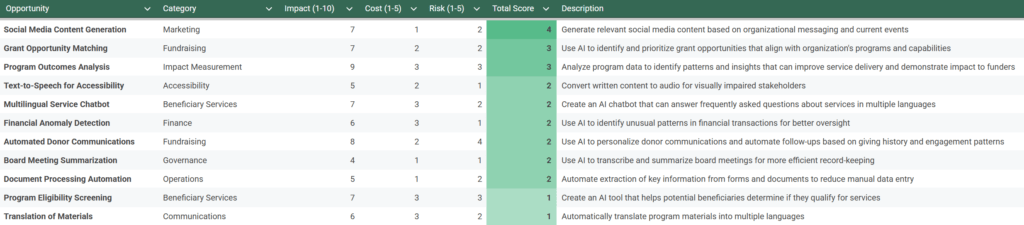
You can put all the ideas on a spreadsheet and give them a score for each criteria, so you can quickly identify the top priorities for your first AI pilot projects. Hopefully you will find some high-impact, low-cost and low-risk ideas.
📋Template
We have a created a AI Template that might help you follow the steps for this roadmap. For this step, check the “OPPORTUNITIES” tab.
Step 3: Select the right AI tools (vendor selection)
Once you’ve identified high-priority AI opportunities, the next step is to choose the right tools and technologies to bring those ideas to life. This can be a difficult task, as the AI landscape is vast (thousands of different tools and providers) and constantly evolving. This section provides a practical guide to navigating this process.
No-code tools vs. Custom development
You basically have 3 options:
- Use AI tools that are ready to use, no coding required (e.g. ChatGPT).
- Develop your custom AI tools but using existing AI models (e.g. using OpenAI API)
- Train your own AI models from scratch and create custom AI tools for those models
Building your own tools and models gives you more flexibility and control, but it requires much more resources and it’s not guaranteed that you will get better results (the training of AI models could go wrong, you could open unexpected security risks, your custom tool could get obsolete very quickly if the commercial providers keep improving their tools and models… ).
For most nonprofits, the first option (starting with no-code platforms) is the recommended approach. It allows you to test AI solutions quickly, affordably, and with minimal technical risk. You can always consider custom development later if your needs outgrow the capabilities of these platforms.
Key considerations for tool selection
Functionality
Does the tool actually do everything you need it to do?
This includes if the AI tool have the features you need (e.g. Research websites or documents, image creation, big context window, structured outputs, team/access management, API, etc.) and also if the AI model is intelligent enough for your tasks.
Ease of use
Is the tool user-friendly for your staff? Will they be able to use it effectively with minimal training?
Consider the technical skills of your team. You also have to judge if it will be better for your organization to use a multi-purpose AI tool for most tasks (e.g. ChatGPT) or many specific AI tools that are great for certain tasks (e.g. AdCreative for ads, Ideogram for image creation, Cursor for code generation/optimization, Otter for meetings, etc.)
Cost
What is the total cost of ownership?
The main cost could be fixed-price subscriptions or variable costs (e.g. API usage). But you should also add the cost of training, support, maintenance, potential integration costs, etc. Consider free or open-source options where available.
Integrations
Does the tool integrate with your existing systems (e.g. CRM, email marketing platform, database…) or at least with connector platforms (e.g. Zapier, Make, n8n…)?
If your systems are not integrated, your staff will spend more time on low-value repetitive tasks (e.g. copying or uploading data manually) and it will increase the risk of working with old or incomplete data.
Data security and privacy
Ensure that the tool meets your data security and privacy requirements, including compliance with relevant regulations (GDPR, CCPA, HIPAA, etc.). Look for features like encryption, access controls, and data anonymization.
Vendor reputation and support
Choose a reputable vendor with a proven track record of providing reliable support. Read reviews, check their customer satisfaction ratings, and ask for references. Also request demos or trials to test the tools before buying.
Checklists
You might want to create a checklist with all the general requirements that all your AI tools have to comply with (regulations, integrations, etc.) and maybe add specific requirements for certain goals.
Prompt to generate custom checklists
You are a AI consultant for nonprofit organizations. Create a comprehensive checklist for a nonprofit organization to evaluate potential AI tools. The checklist should help them assess whether a tool aligns with their specific needs and requirements. Take into account Our Context and the specific Requirements mentioned below.

# Key areas #

The checklist should include at least the following sections:
1. Functionality
2. Ease of use, cost
3. Integrations
4. Data security and privacy
5. Vendor reputation and support

Feel free to add any other relevant criteria or sections you think would be helpful for a nonprofit in this decision-making process.

# Our context #

> Our mission:
> Our challenges:
> Our goals:
> Software that we use:
> People and skills that we have:
> Available budget for AI projects:
> Legal and Ethical considerations:

# Requirements #

1. Include specific questions or criteria within each area that a nonprofit should consider.
2. The checklist should be in a format that allows for a 'Yes/No' or a rating scale (e.g., 1-5) response for each item.
Checklist example
1. Functionality
- Core Features: Does the tool offer essential features like research support, image creation, large context windows, structured outputs, team management, and API integration?
- Task Intelligence: Is the AI model smart enough to handle our specific nonprofit tasks (e.g. fundraising, volunteer coordination)?
- Specialized Use Cases: Are there specific features tailored to our needs (e.g. donor analytics, event planning)?
2. Ease of Use
- User Interface: Is the tool intuitive and easy for staff to navigate?
- Training Needs: How much training is required for effective use?
- Tool Type: Should we opt for an all-in-one tool or several specialized tools to cover different functions?
3. Cost & Total Ownership
- Pricing Model: What is the cost structure (fixed subscription vs. variable API costs)?
- Hidden Costs: Are there additional expenses for training, support, maintenance, or integrations?
- Budget Fit: Does the tool offer free or open-source alternatives that could meet our needs?
4. Integrations
- System Compatibility: Can the tool integrate seamlessly with our existing systems (CRM, email marketing, databases)?
- Connector Platforms: Does it support integration with platforms like Zapier, Make, or n8n?
- Workflow Impact: Will integration reduce manual work and data discrepancies?
5. Data Security & Privacy
- Regulatory Compliance: Does the tool comply with GDPR, CCPA, HIPAA, or other relevant regulations?
- Security Features: Are there robust features such as encryption, access controls, and data anonymization?
- Data Policies: What are the vendor’s policies on data handling and privacy?
6. Vendor Reputation & Support
- Track Record: Is the vendor well-regarded with a proven history of reliable support?
- Customer Feedback: Have other nonprofits provided positive reviews or testimonials?
- Trials & Demos: Is there an opportunity to test the tool before committing?
7. Mission Alignment & Impact
- Organizational Fit: Does the tool align with our nonprofit’s mission and long-term goals?
- Scalability: Can the tool grow with our organization and adapt to future needs?
- Community Impact: Does the tool offer features that enhance our impact on the community?
8. Additional Considerations
- Future-Proofing: Is the tool regularly updated with new features and improvements?
- Customization: Can the tool be tailored to meet our unique operational needs?
- User Feedback: Is there a mechanism for ongoing feedback and tool improvement?
📋Template
We have a created a AI Template that might help you follow the steps for this roadmap. For this step, check the “TEAM” tab.

Step 4: Launch pilots and iterate
You’ve identified promising AI opportunities and selected the right tools. Now it’s time to put your plans into action. The key to successful AI implementation, especially for nonprofits with limited resources, is to start small, learn fast, and iterate. This is where pilot projects come in.
Benefits of pilot projects
Pilot projects allow you to:
- Validate assumptions: Test whether the AI tool actually works as expected and delivers the anticipated benefits in your specific context.
- Identify and address issues: Uncover any technical glitches, data problems, usability challenges, or ethical concerns early on, when they are easier and less costly to fix.
- Gather user feedback: Collect feedback from staff and (where appropriate) beneficiaries to understand their experiences with the AI system and identify areas for improvement.
- Refine your approach: Use the insights gained from the pilot to refine your implementation strategy, adjust your processes, and optimize the AI tool’s performance.
- Build confidence and buy-in: Demonstrate the value of AI to stakeholders and build internal support for wider adoption.
- Minimize risk: Reduce the financial and operational risks associated with a large-scale AI deployment. A failed pilot is much less costly than a failed full-scale implementation.
Selecting a pilot project
Choose your first pilot project carefully. It should be a good representative of the type of AI application you envision using more broadly, but it should also be manageable in scope. Here are some criteria to consider:
- High potential impact: Select a project that, if successful, will have a noticeable and positive impact on your organization’s work. This helps build momentum and demonstrate the value of AI.
- Low risk: The project should have minimal risks (data privacy, ethical concerns, impact on the community, etc.)
- Manageable scope: Start with a project that is relatively small, well-defined, and contained. Avoid overly ambitious projects that are likely to get bogged down in complexity. A good pilot focuses on a specific problem or task.
- Measurable outcomes: Define clear, measurable metrics for success before you start the pilot. How will you know if the AI tool is working effectively? What data will you collect to assess its performance?
Measure, optimize and (maybe) scale
A pilot project should be an iterative process:
- Monitor performance: Track your metrics regularly and identify any deviations from your expectations.
- Gather feedback: Collect feedback from staff and beneficiaries throughout the pilot.
- Document lessons learned: Keep a record of what you learn throughout the pilot, both successes and failures. Use these learnings to design future AI initiatives and train your staff.
- Scale (or not): Evaluate the results (key metrics and qualitative feedback). If the pilot is successful, you can scale up the AI application to other parts of your organization. If the pilot is not successful, use what you’ve learned to refine your approach or explore alternative AI solutions.
📋Template
We have a created a AI Template that might help you follow the steps for this roadmap. For this step, check the “TEAM” tab.

Step 5: Develop your AI Policy
As your nonprofit begins to implement AI, it’s essential to establish clear guidelines and principles for its responsible and ethical use. This is where an AI policy comes in.
Why an AI Policy is Essential
- Protects Your Organization: An AI policy helps mitigate legal, ethical, and reputational risks associated with AI.
- Builds Trust: It shows that you are committed to using AI in a way that aligns with your values and serves the best interests of your community.
- Promotes Consistency: An AI policy ensures that AI is used consistently across your organization, reducing the risk of ad hoc or inconsistent approaches.
Key Elements of an AI Policy
Your AI policy should be tailored to your organization’s specific context, mission, and the types of AI applications you are using. However, most AI policies should include the following key elements:
- Key principles and goals
- Usage guidelines
- Forbidden use cases
- Tools (allowed and/or forbidden, approval process…)
- Internal governance and teams
- Training
📋Template
We have a created a AI Policy template. It’s designed to be quite easy to understand and apply. It’s quite brief and doesn’t use language that is too formal or difficult. Because a document like this is useless if many people in your organization ignore it or doesn’t know how to apply it easily.
You can use it as the base for your own AI Policy document (maybe adapting a few things to your organization) or just as inspiration to create your Policy from scratch or based or other documents.
Instead of creating a completely standalone AI policy, you may want to add AI-specific provisions into your existing policies (Data Privacy, IT, Ethics or other specific policies).
Other templates, examples and related guides
If you have time, it’s great to check other AI policies and guidelines to get ideas for your own document. We mention here a few good ones:
- Generative AI Usage Policy (real policy of CDT)
- Generative AI Guidelines (real policy of Techsoup)
- Artificial Intelligence Acceptable Use Policy (generic template for nonprofits)
- Generative AI Acceptable Use Policy (generic guidelines for nonprofits)
- AI For Nonprofits Resource Hub (includes useful templates, guides and videos)
Step 6: Build your AI Knowledge Base (the “AI Library”)
The AI Library is a living document (or set of documents) that evolves over time as your organization gains experience with AI. It’s a place to store best practices, lessons learned and helpful resources. It promotes knowledge-sharing, consistency, efficiency, and continuous learning.
Key Components
Your AI Library should probably include the following components:
Best prompts
- Prompts that have worked well for specific tasks. Maybe divide them by department or give them tags to make them easier to find.
- Examples of prompts that didn’t work well, and why.
- Tips for crafting effective prompts.
Reliable data sources
- Internal databases or documents (e.g., CRM data, grant proposals…).
- Publicly available datasets (e.g., government data, research data…).
- Information on data quality and potential biases.
Recommended training materials
- Online courses
- Relevant articles and videos.
- Recommended newsletters, conferences and communities.
- Internal training materials and templates.
- Your AI Policy (and any related policies).
Approved AI tools and platforms:
- Links to the tool’s website and documentation.
- Information on licensing and cost.
- Contact information (official support and internal expert)
Lessons learned:
- What worked well?
- What didn’t work well?
- What would you do differently next time?
- Any unexpected challenges or benefits?
Platform
Choose a platform for your AI Library that is easily accessible and user-friendly for your team. So it’s probably better to use the same tool that you’re already using for knowledge sharing. Some options include:
- Shared Document/s (e.g., Google Docs, Microsoft Word)
- Project Management Tool (e.g., Notion, Asana, Trello)
- Internal Wiki or Intranet page
It’s important that the Library can be easily updated, so it remains relevant and useful. You can let any user edit it (and keep track of changes) or maybe only give edit permissions to your AI Officer or AI Core Team.
📋Useful resources
One of the most powerful elements of the AI Library is sharing great prompts. But to create great prompts, you should know first the basics of prompt engineering. Check our guide “Prompt Engineering for Nonprofits“. If you have time, check also other articles about this, like “Working with AI: Two paths to prompting” and “How to Write Great Generative AI Prompts for Nonprofit Workflows“
Template: AI Roadmap
As mentioned above, we have a created a AI Template that might help you follow the steps for this roadmap.
The link above will invite you to copy the file (it’s created with Google Sheets, so you will need a Google account). After that, you will own the new file. You will be able to edit as you wish and nobody else will be able to access it until you configure your sharing preferences.
This template has “fake examples” (not coming from a real organization), but they might give you some useful ideas to implement this on your own organization.