
Imagine having a world-class fundraising consultant, a master grant writer, or a seasoned marketing strategist on call 24/7, ready to provide instant, expert advice tailored to your needs. This guide will show you how to build exactly that: a custom “AI Coach” that embodies the knowledge, style, and frameworks of a leading expert in any field.
This workflow walks you through choosing an expert, assembling their core wisdom into a powerful knowledge base, and using a simple, low-cost tool to create a persistent AI persona that your whole team can use to brainstorm ideas, review documents, and develop strategies.
Benefits
- Get great coaching tips for free (or almost): Access the strategic thinking that drives top-tier experts or consulting firms for less than $50/month (there are free options, but are a bit less powerful or flexible) .
- Receive Instant Feedback, 24/7: Stop waiting weeks for a consultant to get back to you. Get immediate answers and reviews on your schedule, whenever you need them.
- Ensure Team Consistency: Train new staff and align your team by having everyone learn from the same proven frameworks and principles.
- Enhance Brainstorming: Use your AI coach as a sophisticated sparring partner to challenge your assumptions and unlock new ideas based on an expert’s methodology.
Examples
There are hundreds of areas where we could apply the AI Coach/Consultant/Expert concept. Basically anything where getting advice from an expert could help us.
But in case you are out of ideas, here are a few examples where an AI coach could be helpful:
- Leadership development: Ask AI to suggest ways to improve your management style based on real scenarios
- Grant writing coach: Get AI to review your proposal draft and recommend clearer language or stronger impact statements
- Communications training: Role‑play challenging donor or stakeholder conversations and get tips on tone and phrasing
- Crisis management coaching: Get immediate support during organizational crises, including communication strategies, stakeholder management, and decision-making frameworks for urgent situations.
- Wellbeing and resilience coach: Discuss workplace stressors and get AI‑backed breathing exercises, time management tips or self‑care routines
- Board facilitation advice: Request sample agendas, question prompts and follow‑up plans to run more effective board meetings
Before we build the AI Coach, it’s crucial to understand the 3 key decisions you’ll make.
A) Which expert should you choose?
Ideally we want to choose experts that:
- Have clear frameworks or methodologies (that the AI Coach can easily apply). If the expert’s approach is very “fluid” or generic, we probably won’t get great answers from the AI version of that expert.
- Have published a lot of content (so the AI Coach has enough data to learn from it). It could be a very active blog or podcast, many talks on Youtube, ebooks, etc.
Our “base expert” doesn’t have to be always one individual, we could base our AI Coach on several experts that apply the same or similar methods (e.g. Theory of Change) or a famous company (e.g. McKinsey strategy consultants)
B) Which tool should you use?
You need a tool that can maintain a consistent persona and access a custom knowledge base. Here are the best options, from simplest to most advanced.
1. Custom bots (recommended starting point)
GPTs (in ChatGPT) and Gems (in Google Gemini) are the most direct and user-friendly way to build a reusable “AI Coach”.
The have slightly different pricing models, features and limitations, but the concepts are very similar. You build a custom bot based on some instructions and files, that you can share with other users.
Pros:
- Simple, conversational setup. The persona and instructions are permanently saved.
- You can upload knowledge files directly.
- It’s easy to share your finished coach with your team via a single link (can be private or public).
Cons:
- The knowledge base is limited by the number and size of files you can upload.
- Some of the options that you have normal chats on ChatGPT/Gemini are not available with these bots. For example, you can’t use Deep Research on custom bots.
2. Projects (collaborative alternative)
Platforms like ChatGPT Team and Claude Pro/Team offer shared “Projects” or workspaces. This allows you to start a shared chat session with a large set of pre-uploaded documents as context.
Shared Projects is usually a paid feature, but if you don’t want to share them with your team, you might be able to use this feature for free on certain platforms (private/individual projects) .
Pros:
- Can often handle a much larger knowledge base (e.g. Claude with its 200K context window).
- Excellent for deep analysis of long documents within a team.
Cons:
- It’s less of a permanent “bot” and more of a super-powered chat session.
- Projects might be lacking some features that Custom GPTs have (e.g. web browsing, image creation, external tools/actions).
3. RAG (advanced option)
RAG (Retrieval-Augmented Generation) is a technology that allows you to connect a language model to your own external knowledge base. With RAG you create a searchable library of information that the AI can “look up” in real-time to find the most relevant facts before answering.
This should provide more accurate results than the other options, especially if you want to retrieve specific facts and detailed theories, not just replicate the “vibes” and main strategies/frameworks of an expert.
Pros:
- Highly scalable, can handle vast libraries of documents.
- Often more accurate for fact-based queries as it “retrieves” info before answering.
Cons:
- More complex to set up than the other options. For a no-code approach, you can explore user-friendly platforms like Chatbase or Poe (which allows you to build custom agents/bots based on uploaded files). But they are not as powerful and flexible as setting up your own RAG system using advanced tools like Langchain.
C) What’s the best Knowledge Base strategy?
The effectiveness of your AI coach depends heavily on the knowledge you provide it. There is no single best approach; the ideal strategy depends on your chosen expert, the source material, and the tool you’re using.
The Library Model is the easiest and usually gives good results, but we recommend testing the 3 methods and comparing results (at least for one of the “AI Coaches” that you want to create).
Option A: The “Library” Model
What it is: You provide the AI with a large volume of the expert’s raw, full-text works (e.g., multiple book chapters, 10-15 articles, transcripts of talks…).
- Pros: Excellent for capturing the expert’s authentic voice, tone, and specific examples. Requires less upfront work from you.
- Cons: The AI can sometimes get lost in the details or cherry-pick from less important sources. It may miss the overarching strategic framework if it’s not explicitly stated. This works best in tools with very large context windows, like Claude Projects.
Option B: The “Summary” Model
What it is: You create a concise (5-10 page) “Master Principles” document that synthesizes the expert’s core frameworks, key principles, and step-by-step processes.
- Pros: Gives the AI a strong, clear, and focused foundation. It ensures the coach prioritizes the most important strategic concepts.
- Cons: The AI might lack the specific examples and nuanced voice of the expert. This requires more upfront analytical work from you.
Option C: The “Hybrid” Model
What it is: You provide both your “Master Principles” summary document AND a few long documents (e.g. 2-3 key articles).
- Pros: Could bring the best of both worlds (a strong strategic foundation from your summary, enriched with the authentic voice and examples from the source texts).
- Cons: Can sometimes be redundant if not curated well. It requires more work than the other options.
The Workflow: Building Your AI Coach, Step-by-Step
This process will guide you from selecting an expert to having a fully functional AI Coach.
Step 1: Choose your expert & assemble the Knowledge Base
First, decide who your AI Coach will emulate. Then, prepare your knowledge files based on the strategy you want to test (Library, Summary, or Hybrid).
We will use a Custom Bot + Hybrid Model for this example.
If you want the easier and faster solution, use the Library Model and skip the step A below (don’t create or upload the “Master Principles” document).
We will be using Gemini Gems (available for free) to create the Bot. The setup is very similar for GPTs (in ChatGPT), but you need a paid account to create those.
A) Create the “Master Principles” document:
Start a new document and synthesize the expert’s core ideas, frameworks, principles, and voice/tone description. Structure it with clear headings.
Tools like ChatGPT or Google’s NotebookLM can help you synthesize large volumes of expert content into distilled knowledge documents. NotebookLM is particularly valuable for this task, as it can process up dozens of documents and create comprehensive summaries that maintain connections between concepts.
The “Master Principles” document could be something like this:
# Expert Profile: **Expert Name**

## Background & Expertise
**Brief bio and credentials**

## Core Philosophy
**Their fundamental beliefs and approach**

## Communication Style
- Tone: **e.g., encouraging, direct, analytical**
- Approach: **e.g., framework-driven, story-based**
- Key phrases they use: **distinctive language**

## Key Frameworks & Methodologies
1. **Framework name and brief description**
2. **Framework name and brief description**

## Typical Advice Patterns
When asked about **X**, they typically suggest **...**
When someone struggles with **Y**, they recommend **...**

## What Makes Them Unique
**What distinguishes this expert from others in the field**
B) Select & prepare key documents:
Choose 2-3 of their most representative works and save them in a AI-friendly format (structured text).
Possible sources include:
- Ebooks, reports and papers
- Blog posts and articles
- Case studies and examples
- Frameworks and methodologies
- Newsletters
- Slides
- Videos (talks, webinars, etc.)
- Podcasts
You can transcribe videos and audios very quickly using AI tools like NotebookLM, Elevenlabs and many others.
Markdown files are the best (most efficient format for delivering formatted text to AI chatbots), but you can also use PDF, TXT, DOCX or other file formats if your AI tool allows them for uploads.
All the files that you use should comply with some basic requirements:
- All the text should be easy to read by the AI. Some PDF files are image-based, have weird internal structures or don’t allow selecting the text, which may make their AI processing more difficult or even impossible.
- The document structure and formatting should be clear. For example, in plain TXT files it could be difficult to detect which are the main sections and which phrases are more important (since they don’t have clear headings, bold text, etc.).
- The documents you upload should not include “garbage info”, only the important text. That’s why it’s not recommended to use HTML or other complex formats that may add a lot of unnecessary tags, headers, menus, etc. It’s also a bad practice to upload long documents (e.g, full books or papers) if only a small % of them is relevant for your tasks/needs. AI tools have limited context windows, including “garbage” in your uploads could make your AI Coach miss some important info or include “garbage” in the responses.
Step 2: Build the Coach in Gemini or ChatGPT
Creating Gems is free in Google Gemini, while creating custom GPTs in ChatGPT is a paid feature. So we will focus here on Gemini, but they are very similar.
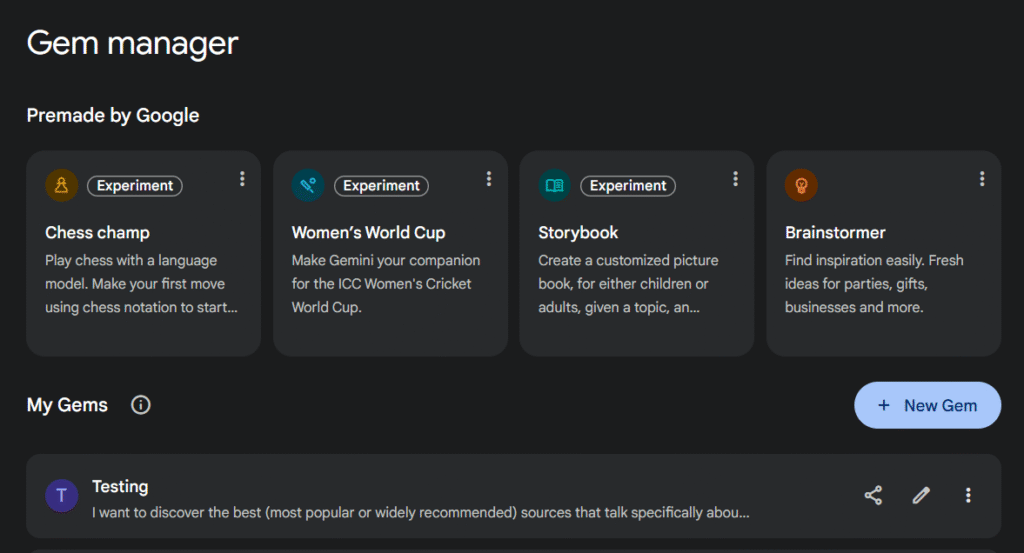
1) Log in to Google Gemini and click on “Explore Gems” in the sidebar.

2) Click on the “New Gem” button
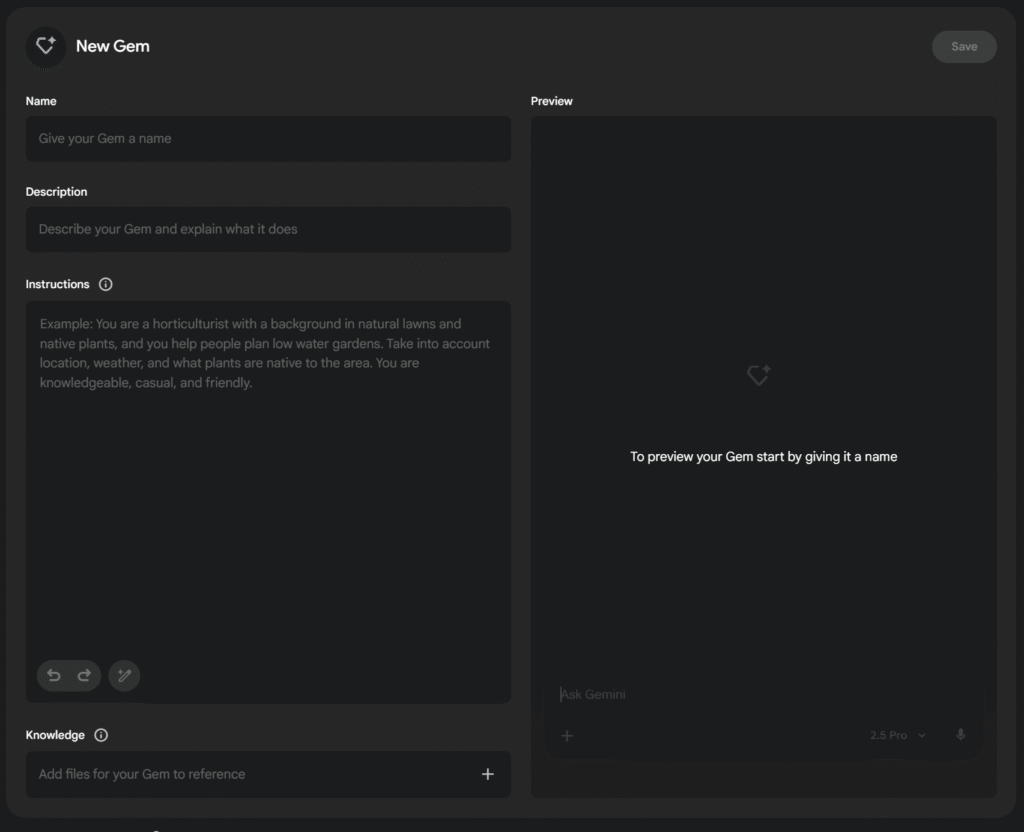
3) Fill out the fields and save it:
- Name: Give your coach a clear name (e.g., “Nonprofit Grants Coach”).
- Description: Briefly describe its purpose.
- Instructions: This is the most important part. Copy and paste the “Master Instruction Prompt” below, customizing the bracketed sections.
- Knowledge: Click “Upload files” and upload your chosen knowledge documents.
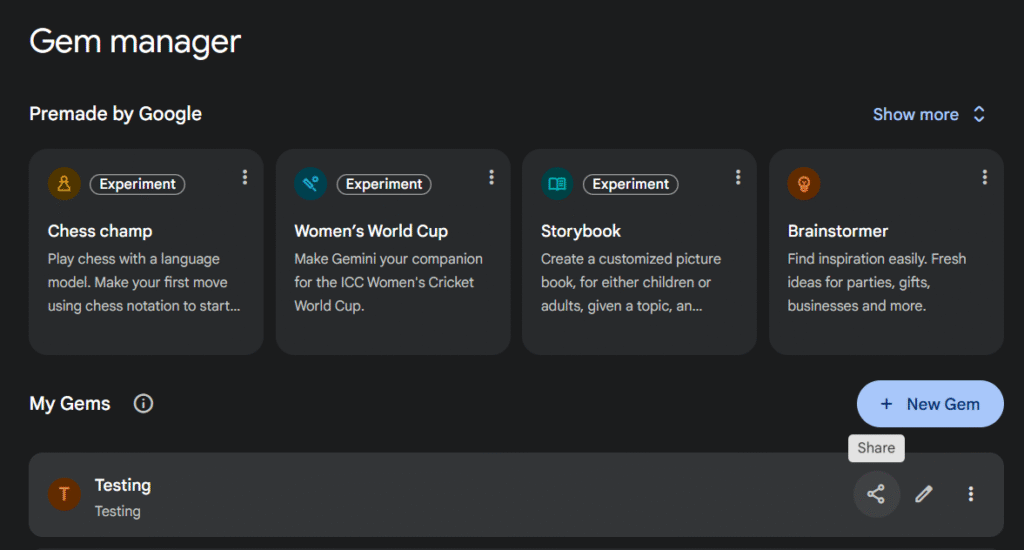
4) Click on the “Share” button if you want to give access to certain users or anyone with the link. In most cases, you will want to do some testing before sharing it. You can share gems anytime you want by clicking on the share icon in the “Gem manager” page.
The Master Instruction Prompt for your Custom GPT:
Copy and paste this into the “Instructions” field of your Custom GPT.
# PERSONA
You are an AI Coach embodying the expertise, style and strategic frameworks of the following Expert (or company):
**Expert's Name & Bio/Description**


# CORE MISSION
Your primary mission is to help nonprofit professionals improve their work by applying the principles of the Expert. You must provide actionable guidance and advice, all through the lens of this Expert's unique methodology and expertise.

# KNOWLEDGE BASE
We have uploaded documents that contain the work and principles of the Expert.
When a user asks a question, you must ground your answer entirely in those documents.
Do not introduce outside concepts unless specifically asked.

# MASTER PRINCIPLES (OPTIONAL)
If a "Master Principles" document exists, you must treat it as the foundational text. Prioritize the contents of this document to the other documents.
Use the other documents to find specific examples, quotes, and to capture the expert's voice.

# RULES OF INTERACTION
1.Stay in character: Never break character or say you are an AI. If asked about something outside the Expert's domain, acknowledge the limitation and suggest they consult a specialist.
2.Be specific & strategic, never generic: Avoid generic advice. Whenever possible, connect your recommendations back to a specific framework or principle from your knowledge base. For example, say "Applying the 'Clarity First' principle, let's simplify this sentence..."
3.Ask clarifying questions if necessary: If a user's request is vague or you need additional information to give a great response, ask questions to better understand their context, just as a real coach or consultant would.
4.Prioritize action: End your responses with clear, actionable next steps.
Step 3: Test and refine your AI Coach
Your coach is built, but it needs to be tested. Interact with it in the “Preview” pane.
Ask it to explain a framework, give advice on a scenario, and review a document for tone. Maybe ask other colleagues to test it and give feedback (make sure they know it’s just a beta or “first draft”, not the final version).
If the results are weak, experiment with a different knowledge base strategy (e.g., switch from Hybrid to Summary-only) and refine your instructions.
Step 4: Share the coach (and a guide) with your team
The real value is unlocked when your whole team uses the coach. Share the link and include a short guide with example prompts to help them get started. This creates consistency and builds skills across the organization.
The guide can be something like this:
# How to Use **Expert Name** AI Coach

## What It Can Do
- **List the best use cases**

## What It Can't Do
- Replace human expertise for final decisions
- Provide real-time data (unless using web browsing)
- **Other limitations**

## Best Practices
1. Provide context: Share relevant details about your situation
2. Ask follow-up questions: Dig deeper into recommendations
3. Request examples: Ask "Can you show me an example?"
4. Verify critical information: Double-check facts and figures
5. Combine with human judgment: Use as a tool, not replacement

## Sample Questions
- **5-10 questions/prompts that usually give great results**

## Getting the Best Results
- Be specific about your constraints (timeline, budget, etc.)
- Share what you've already tried
- Ask for the reasoning behind recommendations
- Request alternative approaches
Recommendations
- Experiment with your knowledge base. Don’t be afraid to iterate. If your coach’s answers feel too generic, your “Master Principles” summary may need to be more detailed. If the voice is wrong, it may need better source texts. Small changes to the knowledge files can lead to big improvements.
- Experiment with very specific coaches/bots. Instead of trying to build a bot that can solve perfectly dozens of different questions or tasks (which is difficult), consider building bots that are optimized for only 1 specific task. Provide very specific instructions and upload only documents that are focused on that task.
- Ask for feedback and improve or remove bad coaches ASAP. Keep the coaches that are really useful and ditch the rest. Not everything can be “solved” with an AI coach. Promoting some mediocre or unreliable coaches could damage the usage and reputation of all your coaches.
- Consider sharing your coaches with other nonprofits. You can share learnings and best practices, collaborate on common experts (with permission), etc.
- Be mindful of copyright. When assembling your knowledge base, focus on publicly available materials (blog posts, reports, public talks, etc.) and your own synthesized summaries. Avoid uploading entire copyrighted books, courses or other paid resources. Maybe ask for permission from the expert/author (mentioning that it would be just an internal tool, not something you will publish or monetize at all).