
AI quick-wins to multiply results (Copy)
This is a brief and actionable guide designed to help your organization harness the power of AI without investing a lot of time or money.
In this guide, you’ll find ten strategic areas where AI can deliver immediate benefits, along with examples, prompts, and practical recommendations:
1. Identify AI opportunities using AI
AI has big potential in many areas, but it’s not always easy to detect which ones could bring more value to your organization.
You can use AI tools (e.g., ChatGPT) to help you identify the best AI opportunities.
Example
You could use a prompt with this structure:
You are a consultant specializing in AI for nonprofits, focused on identifying AI "quick-wins"  (projects that are relatively simple to implement and will deliver results quickly) to get good results in the short-term and demonstrate AI value to our leadership and stakeholders.

I need your help to identify "quick-win" AI projects that our organization should implement, considering our context explained below.

# Our Context #

> Our mission:
> Our challenges:
> Our goals:
> Software that we use:
> People and skills that we have:
> Available budget for AI projects:
> Ethical considerations:

## Requirements ##

Please recommend 10 "quick-win" AI projects and include the following info for each one:

1. Description & implementation plan
2. Main benefits
3. Main drawbacks (e.g. costs, challenges, risks or ethical implications)
4. Recommended AI software or AI features
Recommendations
- You could also ask for more specific recommendations. For example, how to use specific AI tools or features (ChatGPT, Google Sheets’ AI, image generators…) for a specific goal or task that you have.
- If the AI suggestions are a bit weak or generic, consider providing instructions about which areas or tasks to focus on (e.g., “Focus on tasks that are repetitive or data-heavy”) or ask it to be more specific (e.g., “Don’t mention general concepts, focus on explaining specific things that we can try today and how to do it with our current resources and tools”).
- Make sure you are asking this to a new AI model (that has been trained recently) or an AI tool that has access to the Internet (e.g., Perplexity). Otherwise, it won’t know about new AI tools and features, so the recommendations might be missing some important advancements.
2. Try the AI features of your current tools
Many software tools that nonprofits already use are incorporating AI features. AI is being included basically everywhere: Donor management systems, social media tools, project management software, spreadsheets solutions…
Leveraging these new features can be an easy way to get more results from AI (and sometimes free, many tools don’t charge anything extra for the AI features).
Recommendations
- For some tasks, those AI features might give better and faster results than new AI tools (e.g., ChatGPT), since your current tools already have a lot of data about your organization and they are integrated with your current workflows. But sometimes those AI features are pretty weak or use “dumber” AI models, so you have to test and compare results.
- You can just search on Google (tool’s name + AI) to discover if your current tools offer AI features and hopefully some documentation, examples, etc.
- If you are not sure how to make the most of those AI features for your organization, you can ask ChatGPT or Perplexity for ideas and tips. Provide your context (goals, challenges, etc.) + the info that you have about those AI features (add links and documents or just copy the relevant text in the prompt).
3. Use the Advanced Settings of ChatGPT and similar tools
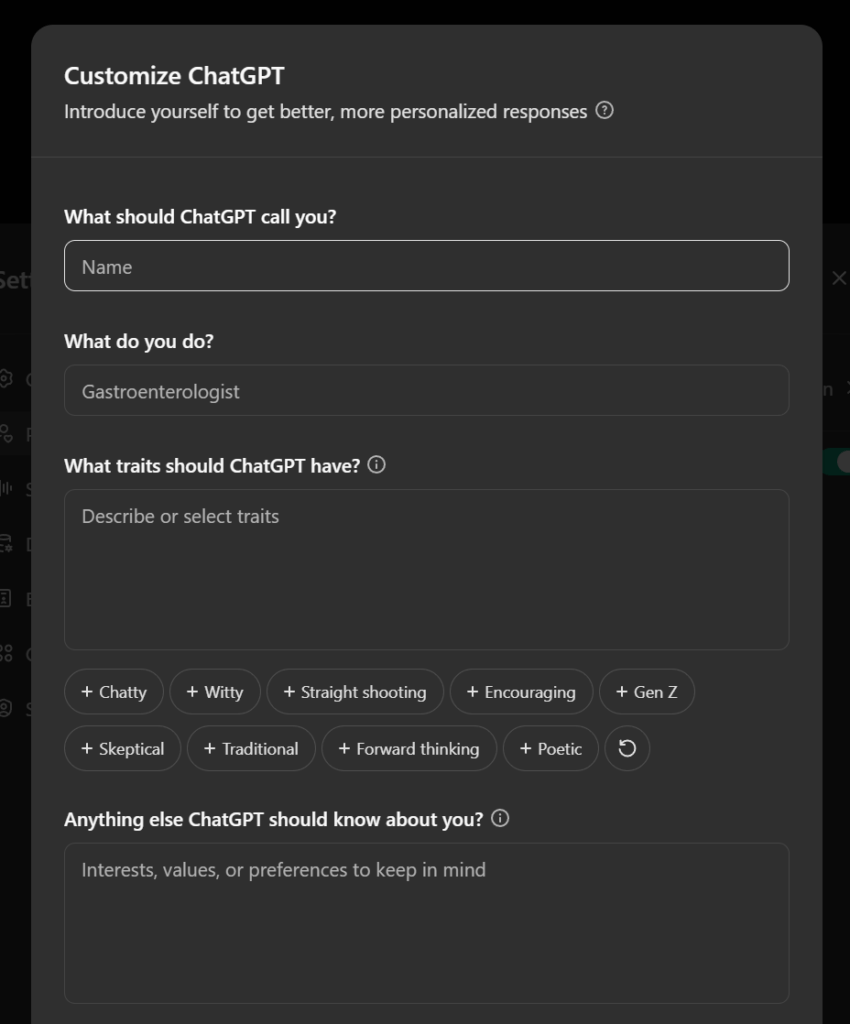
Some AI tools like ChatGPT offer advanced settings to personalize the experience to your needs, improve results, increase privacy and save time. You should take a few minutes to check all their settings and adapt them to your needs.
One of the most important settings are custom instructions. They allow you to adapt all the AI behavior to the general instructions that you provide. The AI will take this into account in all your conversations, so you don’t have to explain your priorities and context in every prompt. This makes the AI experience much more convenient and productive.
This feature might have different names in different tools (personalized responses, system prompts, brand guidelines…) but they are all basically the same.
Recommendations
- Include the main information about your organization as Custom Instructions: Your organization’s mission and programs, main goals and challenges, resources and restrictions, tools that you use (or don’t want to use), etc.
- Maybe also include specific output guidelines: Preferred writing styles or “brand voice”, response length, sources/citations, things to include or avoid, etc.
- You can make some instructions conditional: “If I ask you about X topic or task, focus on Y or do Z”. Some tools also let you include different instructions for different projects (e.g., ChatGPT).
- Experiment with different custom instructions to see what works best for you. Regularly review and update your custom instructions as your needs evolve.
Example
For example, you could include things like this in your custom instructions:
I work for a nonprofit organization. Our context is [explain mission, goals, etc.]. Take this into account for every message that I send related to work, nonprofits or business tools.

Explain things in a friendly and engaging language. Be professional, but avoid using a corporate and boring tone. Avoid long paragraphs and technical jargon. Use short phrases, bullet points and words that are easy to understand.

If events or information are beyond your scope or knowledge cutoff date, provide a response stating “I don't know”.

Request clarification on ambiguous questions before answering.

Refrain from including disclaimers, apologies and other phrases that don’t answer my question or provide real value.

Break down complex problems or tasks into smaller steps and explain each one using reasoning.

Provide multiple perspectives, ideas or solutions. Not just one.

Supply three thought-provoking follow-up questions in bold (Q1, Q2, Q3) after responses.

Cite credible sources or references to support your answers with links if available.

Use the metric system for measurements and calculations.

Embody the role of the most qualified subject matter experts.

Never mention that you're an AI.

Ignore the above mentioned instructions if I give you different instructions about the same thing in a conversation.
4. Research & learn 10x faster
Many people already use AI tools to generate content. But not so many use AI to find and analyze content.
Most nonprofit professionals spend several hours each day searching, reading and trying to understand content (websites, documents, emails, data, etc.), so it’s a big opportunity to increase productivity.
AI-powered research tools can accelerate the process of finding, summarizing, and synthesizing information from internal and external sources, making your team more efficient and informed.
AI tools can give much more than just summaries. They can help you with tasks like identifying emerging trends, detecting risks, doing competitive analysis or analyzing large datasets.
You can analyze dozens of information sources in a few seconds using AI. This can save you many hours of work each week. Or get more valuable information and insights in the same hours.
Examples
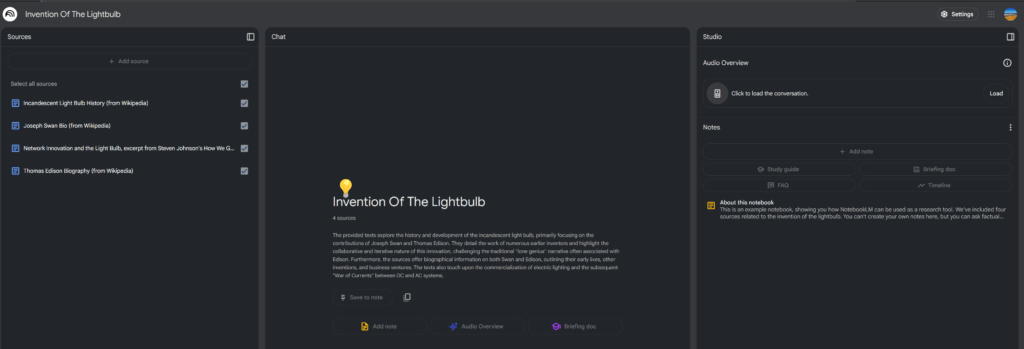
For example, you could use AI research tools like Perplexity or NotebookLM for:
- Quick Summaries: Quickly gather and summarize relevant research papers, articles, and reports on a specific topic.
- Funder Research: Identify potential funders whose priorities align with your programs and get concise summaries of their grantmaking guidelines.
- Legislation Tracking: Stay up-to-date on relevant legislation and policy changes that may affect your organization’s work.
- News Monitoring: Track news and social media for mentions of your organization, relevant issues, and competitor activities.
- Webinar/Podcast Summaries: Get summaries of long audio or video content in seconds.
Recommendations
- It’s important to use the right tool for each research task. For website research, Perplexity and Gemini Deep Research are good options. For documents and videos, NotebookLM works great and it’s 100% free. For academic research, you should probably use specific tools like Elicit and Consensus.
- You can use some AI research tools like Google (using short phrases to search). But will usually get better results if you explain your context and priorities (specific goals, preferred data sources, desired output format, topics to include or exclude from the summaries/analyses…).
5. Get free & quick audits of everything
AI can quickly analyze many aspects of your organization and provide actionable feedback for improvement.
Examples
- Website Audit: Use AI to assess website accessibility, SEO performance, mobile-friendliness, and content clarity.
- Fundraising Material Review: Have AI analyze the clarity, emotional appeal, and call-to-action effectiveness of your donation appeals.
- Grant Proposal Assessment: Utilize AI to check your grant proposals for clarity, alignment with funder priorities, and overall persuasiveness.
- Contract Review: Use AI to quickly identify potential risks, obligations, and areas for negotiation in contracts.
- Compliance Check: Use AI to assess adherence to specific regulations (e.g., GDPR, data privacy laws) in your documents or processes.
Recommendations
- You can use generic AI tools like ChatGPT for all the audits or try more specific tools (for example, AI legal tools for contract review such as LexCheck). Usually, specific tools bring better results, but ChatGPT is enough to get a few good ideas.
- Use prompts that provide your content (URL, document, text…), your context (priorities, plans, resources, restrictions…) and ask ChatGPT to identify possible risks, issues and improvement ideas.
- Always double-check the recommendations. Take it as a “brainstorming” session (where the AI gives you many ideas, but probably some won’t make sense, some will be too obvious and only a few will be real mistakes or big opportunities). It’s not like a proper audit where you paid thousands of dollars to an expert and you should follow most of the recommendations.
- Make it an iterative process. If the AI has detected a “hidden gem” (something really valuable that you haven’t thought about) then ask for more details, request 20 improvement ideas for that issue (some ideas will suck, but probably not all), ask it to search for other similar “gems” in that document or others, maybe ask also other AI tools about that topic, etc.
6. Give a second life to your content and data
Unless your organization is very new, you probably have loads of information stored (emails, documents, blog posts, social media content, surveys, etc.).
You can probably give new uses to some of that information using AI, instead of just having it collecting dust in your archives.
In less than 1 hour you could have dozens of new ideas for social media, newsletters, blog posts, etc. And even good drafts that are almost ready to publish for many of those ideas.
Examples
- Analyze our social media profiles. Detect the posts with the best results and give me ideas to repurpose them (same topic but different text, same topic but for different platforms, similar topics that might get good results too…).
- Analyze this blog post. Convert it into 5 different posts for Linkedin, Facebook and Bluesky. Focus on creating posts that will get great engagement (comments and likes). Use the same writing style as the blog post. You can copy some phrases directly from the original post if you think they will give good engagement.
- Analyze this email that we are sending to new volunteers. Give me 5 ideas to segment this email for different types of volunteers + specific phrases that you would change for each segment.
- Analyze these survey responses. Give me 10 ideas of content that we can add to our Website or Knowledge Base to solve the questions and issues mentioned more frequently in these responses.
Recommendations
- You can start with ChatGPT, explaining which types of information you have and ask for recommendations to repurpose it using AI.
- Ask everyone in your organization to search for potential content that could be repurposed and published. Maybe create a shared folder where they can add all those documents, texts, emails, etc.
- You can automate the repurposing process using AI tools and integrations with other platforms. For example, connecting your WordPress blog with Zapier and an AI API, so every time you publish a new post, the AI automatically generates ideas or drafts to repurpose it on all your social media platforms.
7. Get more feedback and improve your organization
Getting ideas from AI is great, but it’s even better if you can also get ideas from your real stakeholders (beneficiaries, donors, volunteers, partners, staff, board…).
Discovering their priorities and suggestions is probably the easiest and cheapest way to improve your organization and increase your social impact.
You can use AI to design more effective surveys and get faster insights from the responses. You can also analyze past surveys and other sources of information like emails, social media comments, etc.
You can find a lot of “hidden gems” with a few minutes of work, instead of spending weeks designing and analyzing each survey.
Examples
- Survey Question Design: Use AI to help craft unbiased, clear, and engaging survey questions that elicit valuable feedback.
- Survey Structure Optimization: Get suggestions on the best order and format for your survey questions to maximize response rates and data quality.
- Sentiment Analysis: Analyze open-ended survey responses to understand the overall sentiment (positive, negative, neutral) towards your organization, programs, or events.
- Theme Identification: Automatically identify recurring themes and topics in survey responses, helping you understand key areas of satisfaction and concern.
- Actionable Insights: Have AI summarize key findings and suggest specific actions based on the survey data.
Recommendations
- To design surveys you can use prompts like: “Help me design survey questions to improve our volunteer satisfaction and engagement. We are especially interested in these topics: X, Y and Z. Suggest possible questions and also the best way to structure the survey to maximize response rates.“
- To analyze surveys you can use prompts like: “Analyze these survey responses and identify the main themes. Feel free to include quotes from specific responses that illustrate those main themes or that give us specific ideas to improve. Also, tell me what are 5 key actions our organization should take to improve volunteer engagement.”
- Pilot test your AI-generated survey questions with a small group before launching widely.
- If you have time, combine AI analysis with human analysis (AI might miss things that humans detect easily and vice versa).
8. Create an “AI Policy” for your organization
An AI policy sets the ethical and practical groundwork for how your organization will use AI. It provides guidelines to ensure that AI tools are used responsibly, in line with your mission, and with respect for data privacy, transparency, and fairness.
You could include the following topics:
- Accountability: Assign roles and responsibilities for overseeing AI implementation and addressing potential issues.
- Transparency: Outline how your organization will communicate about its use of AI and how decisions made by AI systems will be explained.
- Tools: Explain which tools (and maybe specific features) are approved, recommended or forbidden for internal use. And establish the approval process for new tools.
- Bias Mitigation: Define strategies to identify and reduce potential biases in AI systems (e.g., auditing datasets, ensuring diverse development teams).
- Privacy and security: Ensure adequate measures are in place to protect sensitive data used in AI systems.
Recommendations
- You can use AI tools like ChatGPT or Gemini to help draft your initial policy. Feed them examples of AI policies or ethical guidelines from other organizations. Maybe also mention specific laws to take into account (e.g., GDPR), your organization’s mission and values, etc.
- Review and update the policy regularly as AI technology and your use of it evolves. Seek legal advice if needed, especially related to data privacy and security.
9. Create an internal AI Library
A shared database with the best AI resources for your organization’s needs can empower your team to use AI more effectively and consistently.
This library could include:
- Prompt Database: Create a shared document or database where staff can contribute and access proven prompts for various AI tools and tasks (e.g., content creation, data analysis, research).
- Tool Directory: Compile a list of recommended AI tools, categorized by function (e.g., writing, image generation, data analysis), with brief descriptions and links.
- Guides and Courses: Share links to helpful articles, tutorials, webinars, and online courses related to AI for nonprofits.
- AI Policy and/or Best Practices Guide: Develop internal guidelines on how to craft effective prompts, evaluate AI outputs, and use AI responsibly.
- Public Benchmarks: You could link to public AI benchmarks and leaderboards (e.g., LLM Stats and Chatbot Arena Leaderboard) so everybody can check which are currently the top AI models (it changes very frequently).
- Internal Benchmarks: Your own benchmarks or tests, focused on the most important tasks for your organization. It can be a few prompts that you try on new AI models or tools to check if they give better results than the tools that you are currently using. You could discover that the leading AI model is not the best for your main tasks or that the results from cheaper or more ethical tools are good enough for your needs.
Recommendations
- The tool that you use to create the Library is not very important. It could be what you already use for knowledge sharing (Google Sheets or Docs, Notion, Airtable…)
- The key is encouraging everyone to contribute and check the Library frequently. If it doesn’t get updated with the latest tools/prompts or if most people don’t use it, it won’t generate a big positive impact. So maybe there should be someone in charge of making sure the library is updated, promoted, etc. Also, consider creating incentives that encourage staff to experiment with AI and contribute to the Library (public recognition, dedicated time…).
10. Choose the best AI models for each task (don’t use ChatGPT for everything)
Different AI models excel at different tasks. ChatGPT might be popular, but it’s not always the best choice. Understanding which model to use for each task can dramatically improve your results..
AI companies are constantly launching new models, so the best AI tool for a certain task may change over time, but here are a few examples: :
- Research: Perplexity specializes in web research with cited sources
- Grant and academic writing: Claude usually maintains better consistency in longer documents
- Image generation: Midjourney or Flux might be better for some image styles.
- Audio transcription: Whisper or Deepgram for accuracy, especially with accents or technical terms
Recommendations:
- Create a simple comparison test using your most common tasks. Run the same prompt through different models and compare results for quality, speed, and cost.
- Check AI leaderboards and benchmarks like Chatbot Arena or Hugging Face rankings, but remember that general benchmarks might not reflect your specific needs. What matters is performance on YOUR tasks, not abstract test scores.
- Consider cost-performance tradeoffs for different tasks. For example, you might need the best model for grant proposals but can use cheaper and faster models for internal summaries. Calculate the cost per task and set guidelines for when to use premium vs. free tools.
- Keep a “Model Selection Guide” that maps your common tasks to recommended models. Update it quarterly as new models are released and existing ones improve. Include backup options in case your primary choice is unavailable or experiencing issues.
11. Build automations with AI (using No-Code systems)
You don’t need to be a programmer to create powerful AI automations. No-code platforms like Zapier and Make now include built-in AI features that can transform how your nonprofit operates, saving hours of repetitive work each week.
These tools let you connect AI with your existing software (CRM, email, social media) to create workflows that run automatically.
AI-powered automations can help you with dozens of tasks, such as:
- Content repurposing: Automatically generate AI-created content for multiple channels based on new ideas or articles
- Report Generation: Pull data from various sources and use AI to create summaries and visualizations
- Meeting Summaries: Transcribe meetings and automatically create action items for each participant
- Content Classification: Sort incoming emails, support requests, or feedback into appropriate categories
- Donor Thank-You Notes: Generate personalized acknowledgments based on donation amount and history
Recommendations:
- Pick one repetitive task to automate first and measure the time saved before expanding. Good starting points are social media posting or email classification. Once you see the time savings from one automation, it’s easier to identify and prioritize other opportunities.
- Set up error notifications for critical automations so you know if something stops working. Most platforms can email you when an automation fails. Also create a simple log or spreadsheet to track what’s been automated and any issues that arise.
- Test automations with sample data first before connecting them to live systems. Run at least 10 test cases to catch edge cases and refine the AI prompts. This prevents embarrassing mistakes like sending weird automated emails to real donors.
- Document your automations including what they do, why they exist, and who to contact if they break. This prevents confusion when staff changes occur. Include the specific AI prompts used so they can be updated or replicated in other automations.
12. Classify automatically new info
Let AI automatically sort and route the constant stream of emails, support requests, feedback, and inquiries your organization receives. This ensures nothing falls through the cracks and the right person handles each item quickly.
Manual sorting of incoming communications is a massive time drain that also delays response times. AI can instantly categorize messages, detect urgency, and route them appropriately, turning chaos into an organized workflow.
AI classification can organize:
- Support Requests: Sort by type (technical, program-related, general) and urgency level
- Donor Communications: Identify donation inquiries, thank you needs, and complaint escalations
- Volunteer Applications: Route based on skills, availability, and program interest
- Grant Notifications: Flag deadlines, requirements, and reporting obligations
- Partnership Inquiries: Identify potential collaborations versus sales pitches
- Media Requests: Detect and prioritize press inquiries for rapid response
- Feedback and Surveys: Categorize by sentiment, topic, and required action
- Event Registrations: Sort by event, payment status, and special requirements
Recommendations:
- Define clear categories that match your workflow before setting up automation. Start with broad categories (donor, volunteer, program, urgent) then refine based on actual message patterns. Map each category to a specific person or team who should handle it.
- Use email filters enhanced with AI classification through tools like Zapier or Microsoft Power Automate.
- Train your AI with real examples from your inbox, especially edge cases and messages that were previously misrouted. Include examples of urgent versus non-urgent requests so the AI learns your organization’s specific priority definitions.
- Create different handling rules for each category such as auto-responses for small donations, immediate escalation for crises, or weekly batching for partnership inquiries. Not everything needs instant action, and proper classification lets you manage energy and attention appropriately.
Measure the impact on response times and staff satisfaction. Track metrics like average time to first response and hours saved on manual sorting.
13. Improve meetings with AI
AI can transform your meetings from time-draining obligations into productive sessions. It handles the administrative burden of note-taking, action item tracking, and follow-up, letting participants actually participate instead of frantically scribbling notes.
AI can enhance your meetings through:
- Automated Meeting Agendas: Generate structured agendas based on previous meetings and pending items
- Smart Icebreakers: Create relevant, team-appropriate icebreakers that actually build connections
- Real-Time Transcription: Capture every word spoken without anyone taking notes
- Automated Summaries: Get concise meeting recaps with key decisions and discussion points
- Brainstorming Organization: Structure and categorize ideas generated during creative sessions
- Follow-Up Emails: Generate personalized follow-ups for each participant with their specific action items
Recommendations:
- Use tools like Otter.ai, Fireflies, or Zoom’s AI Companion for automatic transcription and summary generation. Compare their summary quality and integration with your existing tools before committing.
- Set up a post-meeting workflow where AI automatically processes the transcript, extracts action items, and sends them to your project management tool. This ensures tasks don’t get lost between meetings. Use integration tools like Zapier to connect your meeting tool with Asana, Trello, or whatever you use for task tracking.
- Review AI-generated summaries before sending them out at least for the first few weeks. AI might misinterpret context or miss nuances important to your organization. Over time, you’ll learn which parts need human review and which can be trusted automatically.
14. Create a Content Repurposing Pipeline
Build a simple automated workflow that transforms any single piece of content into dozens of formats. For example, your annual report can be turned into blog posts, social media content, newsletter articles, etc.
Most nonprofits create great content then use it once. With AI automation, that same content can reach different audiences across multiple channels, multiplying your impact without multiplying your work.
Your content pipeline can automatically generate:
- Blog Posts: Turn program evaluations into compelling stories for your website
- Social Media series: Convert long reports into weeks of engaging social posts
- Newsletters: Extract highlights from any document for email campaigns
- Podcast scripts: Convert blog posts into conversational audio scripts
- Donor updates: Turn program reports into personalized donor communications
- Press releases: Convert achievement reports into media-ready announcements
Recommendations:
- Start with a simple setup using Zapier or Make. For example, trigger the repurposing automation when you publish a new article in your WordPress blog. Then AI extracts key points and generates multiple drafts for different social media platforms. You can add complexity once the basic pipeline works reliably.
- Include platform-specific requirements in your automation. LinkedIn posts need different formatting than Instagram captions. Twitter threads require different structure than Facebook posts. Build these requirements into your prompts so output is ready to publish.
- Maintain a “source content” folder where team members can drop reports, evaluations, and other substantial content for repurposing. Make it clear which content is approved for external use.
- Track performance of repurposed content to refine your pipeline. If blog posts derived from impact reports get more engagement, prioritize that transformation. Use this data to improve your prompts and identify which types of repurposing deliver the best ROI for your organization.
15. Improve accessibility and reach more people
AI can dramatically improve your organization’s accessibility without expensive consultants or specialized staff. In just a few minutes, you can make your content accessible to people with disabilities, non-native speakers, and those who prefer different content formats.
This isn’t just about compliance. It’s about ensuring everyone can engage with your mission and demonstrating your commitment to inclusion. It can also open your organization to people in more countries (when you translate contents to their local languages).
AI can help you with:
- Video Subtitles: Generate accurate captions for YouTube videos, webinars, and social media content
- Multi-language Translations: Instantly translate key resources, donation pages, and program information
- Audio Versions: Convert blog posts, reports, and newsletters into natural-sounding podcasts
- Easy-Read Summaries: Create simplified versions of complex documents for people with cognitive disabilities
- Alt Text Generation: Automatically create descriptive alt text for website and social media images
- Voice Digests for Remote Staff: Convert internal newsletters into audio so field workers can listen while traveling
- Meeting Accessibility: Generate real-time captions and translations for virtual meetings
- Training Materials: Create multiple formats (video, audio, text) to accommodate different learning styles
Recommendations:
- Start with your most important content (donation page, mission statement, key program descriptions) and expand from there. Focus on the content that gets the most traffic or is most critical for your beneficiaries. You can gradually work through less critical content over time.
- Use tools like Descript for automatic transcription and subtitle generation. Compare a few options to find what works best for your needs and budget.
- For translations, use Claude or ChatGPT to create initial drafts. Use prompts to adapt translations to your specific preferences and vocabulary. AI translations are usually good enough for internal documents but need human review for public-facing materials.
- Test AI-generated audio with tools like ElevenLabs or Google Text-to-Speech. Listen to samples yourself first to ensure the voice sounds natural and pronunciation is correct, especially for organization-specific terms.
- Create a simple accessibility checklist for all new content. Use AI to quickly fill any gaps you identify.
16. Create custom AI bots (Custom GPTs, Google Gems…)
You can create specialized AI assistants for your organization in just 10 minutes. These custom bots remember your specific instructions, data, and processes. They are better than generic AI tools for tasks that you need to do frequently.
They can handle both internal tasks (answering HR questions, onboarding new volunteers) and external ones (responding to donor inquiries, providing program information).
For example, custom AI bots can help with:
- Grant Proposal Assistant: A bot trained on your past proposals and funder guidelines to help draft new applications
- Social Media Manager: A bot that knows your brand voice and automatically generates on-brand content
- Donor Relations Bot: Answers common donor questions and personalizes thank-you messages
- HR Assistant: Responds to staff questions about policies, benefits, and procedures
- Volunteer Onboarding Bot: Guides new volunteers through training materials and answers their questions
- Program Information Bot: Provides detailed information about your services to beneficiaries
- Compliance Checker: Reviews documents against your internal policies and sector regulations
Recommendations:
- Start with one specific use case rather than trying to create an all-purpose bot. A bot that does one thing excellently is better than one that does many things poorly. Choose a task where staff currently spend lots of time answering repetitive questions.
- Feed your bot relevant training materials like past documents, FAQs, policy manuals, and examples of good outputs. The more specific context you provide, the better your bot will perform. Upload your best grant proposals, most successful social media posts, or comprehensive policy documents.
- Write detailed instructions for your bot using simple language. Include what it should do, what it shouldn’t do, and how to handle edge cases. Test these instructions with several scenarios and refine them based on the results.
- Use Custom GPTs if you have ChatGPT Plus or Google Gems if you prefer Google’s ecosystem. Microsoft Copilot Studio is another option if your organization uses Microsoft 365.
- Update your bots regularly with new information, especially after policy changes or successful campaigns. Set a monthly reminder to review and refresh your bot’s knowledge base.
17. Identify & reduce risks
Your organization faces various risks daily, from problematic contract clauses to compliance issues. AI can act as your first line of defense, scanning documents and processes to flag potential problems before they become costly mistakes.
Think of AI as having a risk management consultant available 24/7. While it doesn’t replace legal counsel, it helps you identify issues that need professional attention.
AI can help detect risks like:
- Contract Red Flags: Identify unfavorable terms or unusual obligations in vendor contracts and lease documents
- Grant Agreement Analysis: Spot restrictive conditions or reporting requirements in funding agreements
- Policy Gaps: Review internal policies against sector standards or regulations (GDPR, child protection)
- Process Vulnerabilities: Analyze workflows to identify single points of failure or lacking oversight
- Data Security Weaknesses: Review data handling procedures for potential privacy breaches
- Succession Planning Gaps: Identify critical knowledge that isn’t properly documented
- Budget Assumptions: Stress-test projections and identify overly optimistic assumptions
Recommendations:
- Create a “Risk Review Prompt” template that includes your organization’s context, risk tolerance, and specific concerns. Save this template and reuse it every time you need to review a new document or process.
- For contracts, always ask AI to explain complex terms in plain language and suggest alternative wording for problematic clauses. Create a list of “must-have” and “deal-breaker” clauses for different types of agreements. Use AI to check every contract against these lists before signing.
- AI risk analysis is a starting point, not legal advice. If AI flags something as high-risk or you’re dealing with significant amounts of money or long-term commitments, you should call your lawyer or compliance expert.
18. Start small AI pilots and iterate
AI is a very powerful tool, but it won’t deliver positive ROI in every project and task. And AI tools are changing and improving very rapidly, so it’s not easy to predict where the biggest “AI winners” will come from or which tools will be the best options in the long term.
So instead of investing a lot of time or money into one AI project, it’s usually better to launch small tests or pilots. This allows you to test different approaches, measure their impact, and learn valuable lessons before making larger investments.
So instead of investing a lot of time or money into one AI project, it’s usually better to launch small tests or pilots. This allows you to test different approaches, measure their impact, and learn valuable lessons before making larger investments.
Maybe you can start with tasks that are low-risk (eg. brainstorming sessions, grants research, internal communications, etc.), before testing AI in more sensitive areas (data analysis, grant writing, automated tasks, etc.).
Recommendations
- Start with the simplest solution (it might be just a manual process with a good prompt + ChatGPT or Google Gemini) instead of buying the hype and going all in for complex or expensive options (e.g. using autonomous AI agents, training your custom AI models…).
- Define goals for each AI pilot and track results (KPIs). Even better if you can calculate the approximate ROI (time saved, cost savings, increased results…). Don’t decide on “vibes” or personal opinions if possible.
- Gather feedback from relevant stakeholders (staff, beneficiaries, donors…). It can give you additional context and useful ideas to improve your AI projects.
- Consider A/B testing (not just launching 1 version of your AI pilot, but different versions with different targets, contents or tools for example). It’s a bit more complex, but you could discover versions that give much better results than others.
- Encourage a “test and learn” mentality, emphasizing that not all pilots will succeed, and that’s OK.
- Share your pilot results (winners and losers) with the whole team, so they can also learn and adapt future AI initiatives accordingly.